
Claude.ai supports remote MCP servers natively via the Connectors system. The flow uses OAuth, so you don't paste your raw API key into Claude — Claude redeems a token against your key.
#Step-by-step
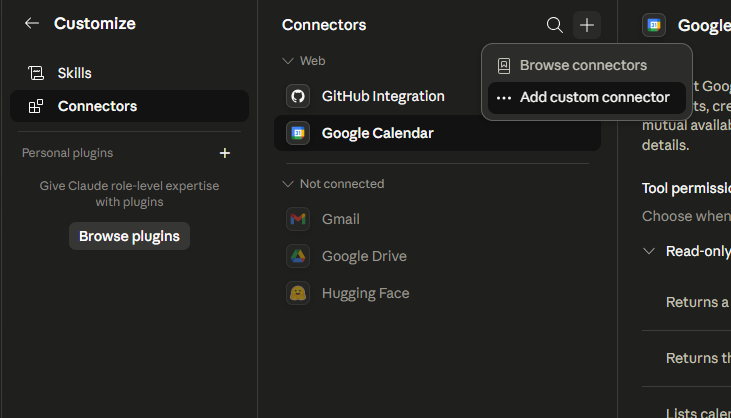
- Go to claude.ai/customize/connectors (or click your avatar → Customize Claude → Connectors).
- Click the + icon, then Add custom connector (requires a Pro / Team / Enterprise plan).
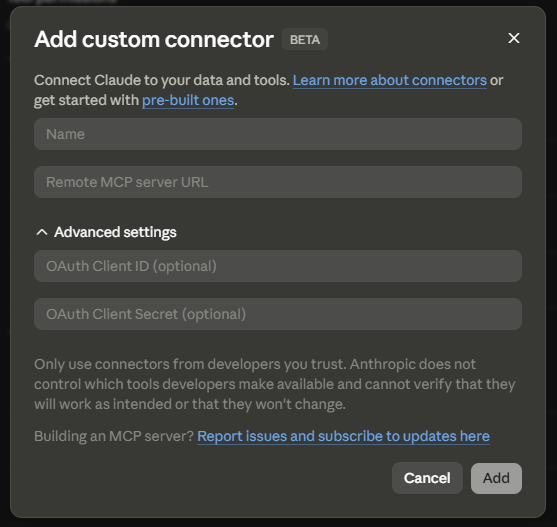
- Name — use a memorable label, e.g.
Webenta Index — fitness(substitute your project name). - Remote MCP server URL — paste
https://mcp.index.webenta.sk/mcp. - Open Advanced settings.
- OAuth Client ID — any reasonable identifier you like, e.g.
claude-web. - OAuth Client Secret — paste your Webenta Index API key (create one under Account → API Keys).
- Click Add and then Connect. Claude will open Webenta to confirm the OAuth grant.
- Back in Claude, open the connector → Tool permissions. Set read tools (
query_rows,list_tables,aggregate) to Always allow. Leave write tools (insert_rows,update_row,delete_row) on Ask until you trust the workflow.
#Set custom instructions
For Claude to actually use your data, give it a nudge. Open your Claude profile → Personal preferences (or any project's Project instructions) and add something like:
text
When I talk about workouts, always use my "Webenta Index — fitness" connector to read past sessions before answering, and write a new row after every completed workout.Per-project instructions
Claude Projects let you scope this to a single chat space. Combine a project-scoped Webenta key with project instructions and Claude will only touch the right data.