
You don't need to design a schema upfront — just tell your agent what you want to track:
text
Please set up a database where I can track my language learning progress.From that single sentence, the agent figures out the shape of your data and calls create_table five times — one table per concern:
- languages — the languages you're learning, with target level and start date.
- vocabulary — words and translations, with spaced-repetition fields like
ease_factorandnext_review_at. - vocabulary_reviews — every review attempt, result and response time.
- study_sessions — daily sessions with duration, type and quality rating.
- milestones — achievements like "finished A2" or "first conversation".
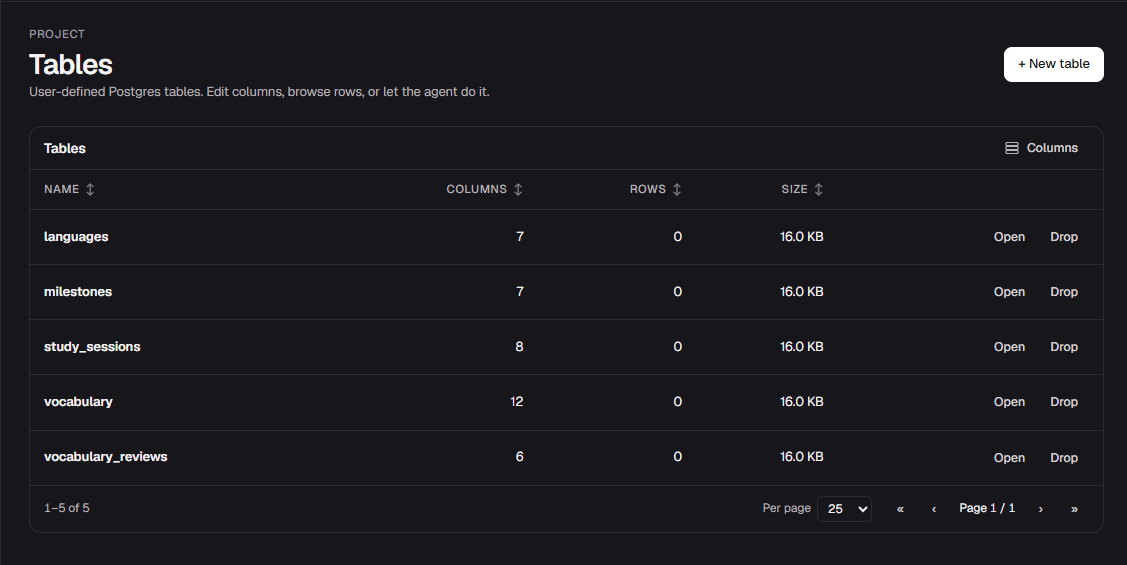
Once the schema is in place, you can start using it straight away. Try something like:
text
Teach me 10 intermediate words in Spanish and save them to my vocabulary table.The agent will insert the rows and you can query and aggregate them any time — filter by language, group by difficulty, track review counts over time.
#Column types
- Text — strings, freeform.
- Number — integer or decimal.
- Boolean — true / false.
- Date — ISO timestamps; agents accept relative dates and they're resolved server-side.
- Enum — fixed set of choices.
- JSON — nested objects for messy structures.
Renames are safe
Renaming a column updates it everywhere — including the schema your agent sees on its next tool call.
With tables in place, head to Querying & aggregating to start pulling data back out, or jump straight to Dashboards to build a live view.